

 info@cultbooking.com
  0049 30 726225 0
Published on: 02 Sep 2026
Wix makes it easy for hotels to build and maintain an attractive website without developing everything from scratch. But the hotel website is only one part of the direct-booking journey. Once a visitor decides to stay, the website needs a professional reservation process that displays live availability and rates and turns interest into a confirmed booking.
CultBooking can be integrated into an existing Wix hotel website without rebuilding the site or changing its design. There are two technical integration methods: link a prominent Book Now button to CultBooking, or embed CultBooking in a Wix page using an iFrame.
For most hotels, CultBooking recommends a Book Now button linked to the responsive booking engine, combined with a personalised booking subdomain such as booking.yourhotel.com. The custom subdomain is not a third integration method. It is a branding and trust feature that strengthens the recommended button integration.
Wix for Your Hotel Website, CultBooking for Direct Reservations
Wix is designed to create and manage websites. CultBooking is designed to convert hotel website visitors into direct bookers. Keeping these roles separate allows the hotel to retain its Wix design while adding a specialised reservation process.
Wix also offers its own hotel application, Wix Hotels by HotelRunner. That may be suitable for properties that want to manage their hotel reservations within the Wix environment. However, choosing Wix as a website builder does not require a hotel to use Wix as its reservation or distribution system.
Hotels that already work with a property management system, channel manager or established distribution setup can connect CultBooking to Wix while keeping the rest of their technology landscape intact.
More Than Booking-Engine Software
With CultBooking, the hotel does not simply receive a booking link and have to manage the setup alone. Every hotel is supported by a personal, dedicated distribution manager who can assist with the booking-engine configuration, the website connection and the wider direct-distribution setup.
-
Responsive direct-booking journey: CultBooking adapts to desktop, tablet and mobile screens.
-
Flexible commercial model: Hotels can choose a fixed monthly plan with commission-free direct bookings or an alternative performance-based model.
-
Hotel-branded experience: The booking engine can use the hotel’s own booking subdomain.
-
Connected distribution: CultBooking can work alongside the hotel’s existing PMS, channel manager and Google connectivity setup.
-
Inclusive booking: CultBooking has been evaluated against WCAG 2.2 Level AA and applicable Section 508 requirements.
Two Ways to Integrate CultBooking into Wix
Both integration methods connect the Wix website with the same CultBooking reservation technology. The difference is where the booking experience appears.
Method 1: Add a Book Now Button—Recommended
The simplest and most reliable approach is to add a clearly visible Book Now button to the Wix website and link it directly to the hotel’s CultBooking URL.
Guests explore the hotel’s pages in Wix and click the button when they are ready to check availability. CultBooking then opens as a complete, responsive booking page where the guest can select dates, compare available rooms and rates, and complete the reservation.
Because the booking engine runs as its own page, it can use the available screen space and adapt to different devices without the height and scrolling restrictions that can occur inside an embedded frame.
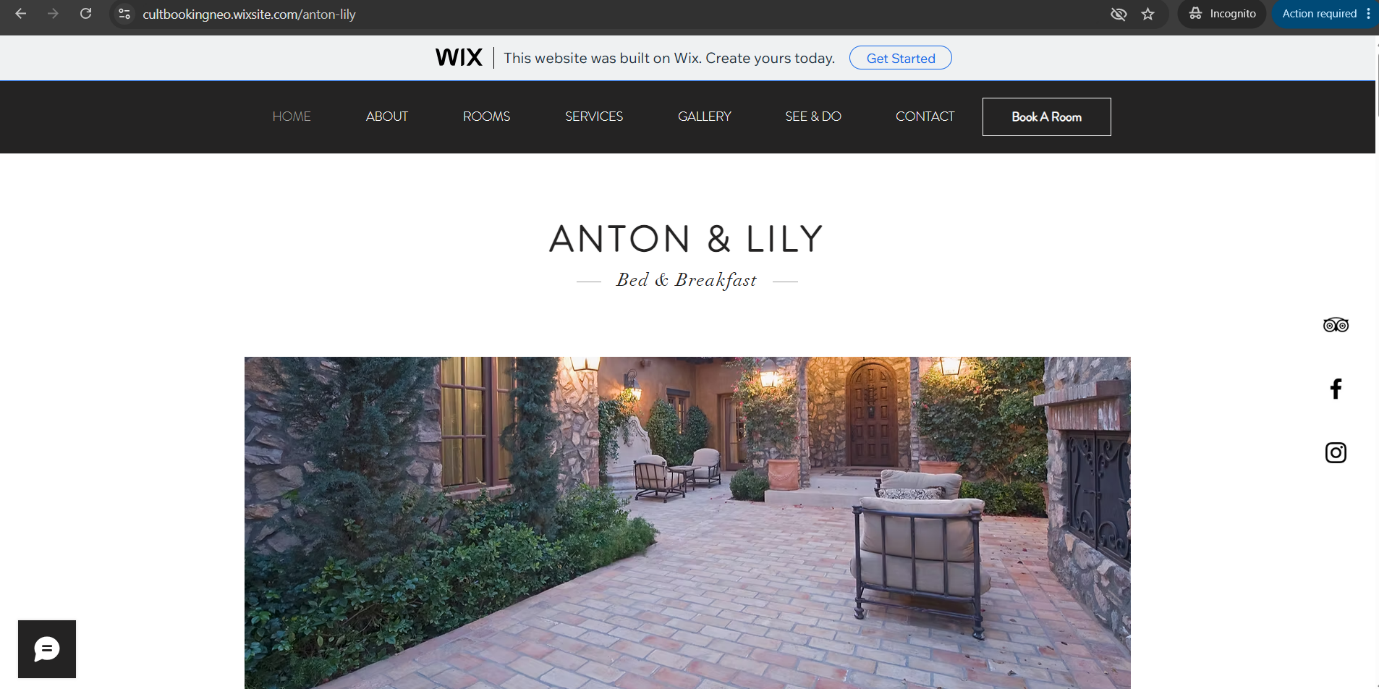
How to Add the CultBooking Button in Wix
Step 1: Obtain Your CultBooking URL
Copy the booking URL provided for your hotel in the CultBooking Extranet. Your dedicated distribution manager can also confirm the correct URL for you.
Step 2: Add a Button in Wix
Open the relevant website in the Wix editor and add a button to the header, navigation area or hero section. Wix offers several editors, so the exact menu labels may vary slightly.
Step 3: Use a Clear Call to Action
Labels such as Book Now, Check Availability or Reserve Your Stay immediately tell the guest what will happen next. Use the same wording and visual style throughout the website.
Step 4: Connect the Button to CultBooking
Choose the option for linking the button to a web address and paste the CultBooking URL. Opening the link in the same browser tab is usually the most predictable experience for guests.
Step 5: Publish and Test
Test every booking button on desktop and mobile. Continue through the complete reservation process rather than checking only whether the first booking page opens.
Strongly Recommended: Use Your Own Booking Subdomain
A customised booking URL makes the transition from the Wix website to the booking engine feel more consistent. Instead of using a standard CultBooking address, the hotel can use an address under its own domain, for example: booking.yourhotel.com
The booking engine is still operated by CultBooking, but the guest sees the hotel’s own domain in the address bar. This supports brand continuity and makes the destination of the Book Now button immediately recognisable.
Technically, the hotel creates a CNAME record in the DNS settings of its domain. If Wix manages the hotel domain, the record is added in the Wix domain settings. If the domain is managed elsewhere, the record is added through that provider.
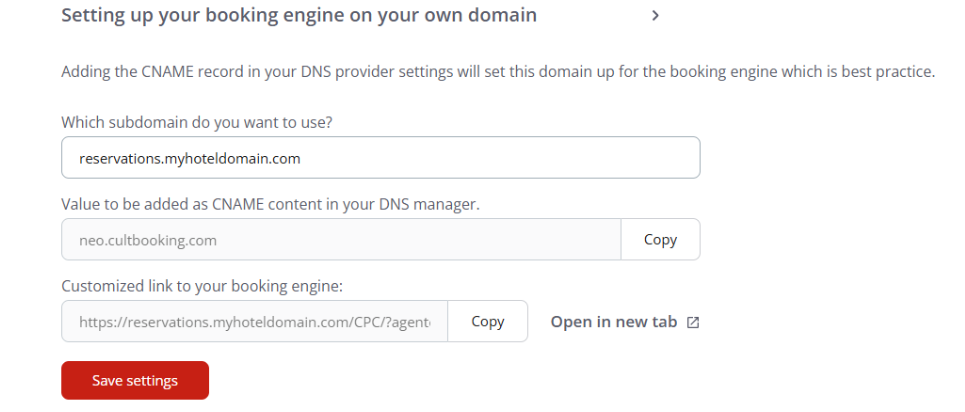
How to Activate the Personalised Booking URL
Step 1: Choose the Subdomain
Use a short, intuitive address such as:
booking.yourhotel.comreservations.yourhotel.com
Step 2: Enter It in the CultBooking Extranet
CultBooking provides the customised booking link and the exact CNAME target required for the domain configuration.
Step 3: Add the CNAME Record
Open the DNS records for the hotel domain and create the CNAME using the host name and target supplied by CultBooking.
Always use the current value shown in the CultBooking Extranet rather than copying an example from an article.
Step 4: Allow Time for Activation
DNS changes are not always visible immediately. Allow time for propagation and for the secure HTTPS connection to become active.
Step 5: Update and Test the Book Now Link
Link every booking button to the personalised URL and test the complete booking journey on desktop and mobile.
Method 2: Embed CultBooking in a Wix Page Using an iFrame
The second option is to display CultBooking directly inside a Wix page using an HTML iFrame. Wix supports HTML and website embed elements, allowing an external booking interface to appear within the page.
This can create a visually integrated first step because guests begin their search without leaving the Wix page. However, the booking engine is displayed inside an area whose dimensions are controlled by the website.
As the booking journey expands, insufficient frame height can lead to internal scrollbars, clipped content or an awkward mobile experience.
For this reason, the iFrame method requires more careful implementation and testing than the Book Now button.
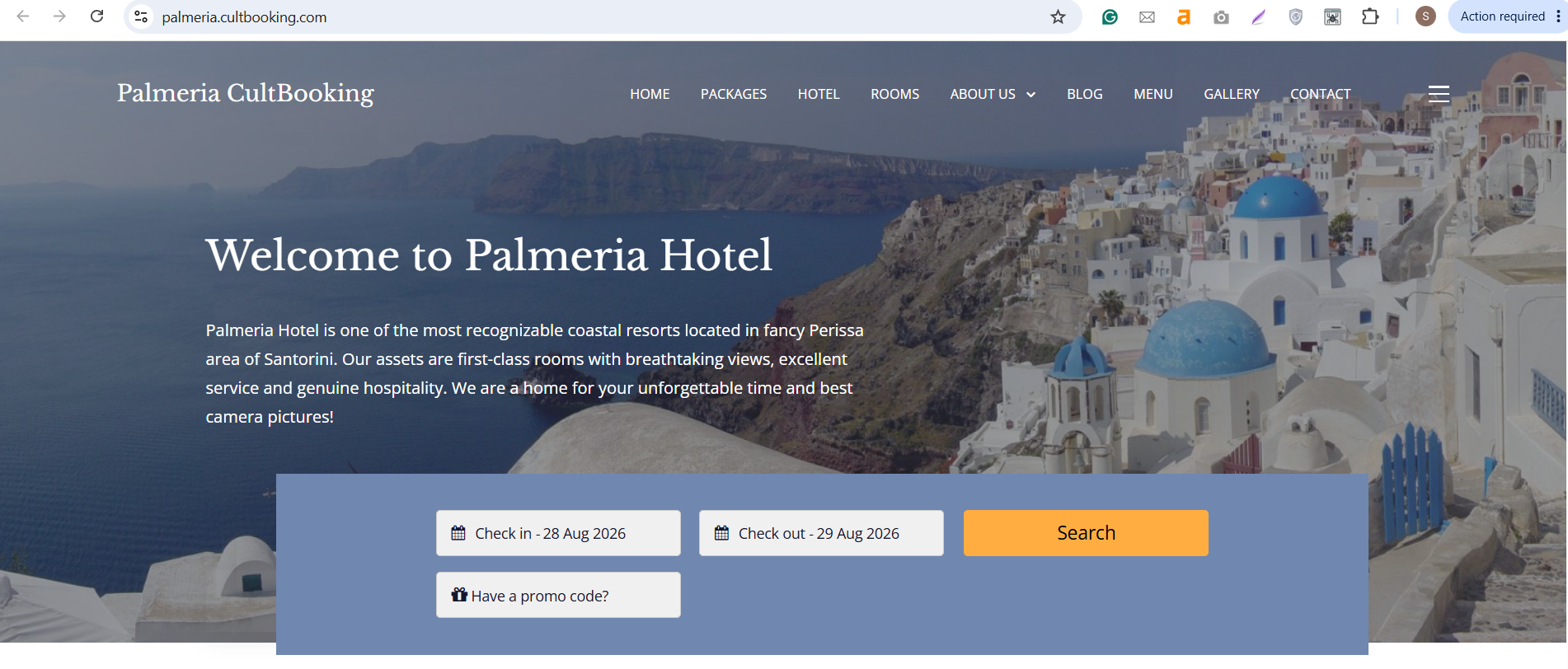
How to Embed CultBooking in Wix
Step 1: Obtain the CultBooking Embed Code
Ask your dedicated distribution manager for the current iFrame code and any implementation guidance applicable to your configuration.
Step 2: Add an HTML Embed Element
In the Wix editor, choose Add Elements, then Embed Code and Embed HTML. The wording may differ slightly between the Wix Editor, Studio Editor and newer editor versions.
Step 3: Paste the CultBooking Code
Insert the supplied code into the HTML field and apply the change.
Step 4: Adjust the Layout
Give the embedded area sufficient width and height. Review the desktop and mobile layouts separately rather than assuming one frame size will work everywhere.
Step 5: Test Every Booking Stage
Select dates, open room and rate details, enter guest information and continue to the final confirmation step.
Check for:
- clipped controls;
- internal or double scrollbars;
- elements that are difficult to use on smaller screens;
- booking steps that extend beyond the visible frame.
For further technical details, see the official Wix guide: Embedding a Site or a Widget.
Which Integration Should Your Hotel Choose?
For most Wix hotel websites, CultBooking recommends the Book Now button together with a personalised booking subdomain.
| Setup | Best suited to | CultBooking assessment |
|---|---|---|
| Book Now button | Hotels seeking the simplest and most robust connection | Recommended |
| Button + own subdomain | Hotels seeking responsive booking and a branded guest journey | Strongly recommended |
| iFrame embed | Hotels with a specific requirement to keep the search inside a Wix page | Possible, but requires careful testing |
Why CultBooking Recommends the Button-and-Subdomain Setup
-
A responsive booking page: CultBooking can use the full browser window and adapt naturally to the guest’s device.
-
Fewer technical layout problems: The booking journey is not restricted by the dimensions of an embedded frame.
-
A recognisable hotel URL: The customised subdomain keeps the hotel’s identity visible throughout the transition.
-
Straightforward maintenance: The hotel can redesign its Wix pages without rebuilding the booking interface.
-
A cleaner accessibility boundary: The booking engine opens as a complete page instead of being nested inside another page structure.
Common Wix Integration Mistakes to Avoid
- Hiding the booking button. Place the main call to action in the header or another immediately visible area and repeat it consistently on important pages.
- Using different booking links. Old or inconsistent URLs can send guests to the wrong hotel, language or configuration. Check all buttons after changing the booking URL or subdomain.
- Testing only the first screen. A successful test continues from date selection through room choice, guest details and confirmation.
- Ignoring the mobile layout. Review the mobile version separately in Wix and on real devices. This is especially important for iFrame implementations.
- Making the iFrame too small. The booking content can grow after the guest selects dates or opens a room. Test the frame at every stage and avoid clipped content or nested scrolling.
- Forgetting the custom domain after a website update. When buttons or menus are recreated, make sure they still use the hotel’s personalised CultBooking URL.
Your Dedicated Distribution Manager Supports the Complete Setup
The technical connection between Wix and CultBooking is simple, but a successful direct-booking setup involves more than placing a link on a page.
The booking URL, hotel branding, room and rate presentation, mobile journey and wider distribution setup should work together.
This is why CultBooking provides every hotel with a personal, dedicated distribution manager. Your contact can guide the Wix integration, help activate the customised booking subdomain and coordinate CultBooking with your existing hotel technology.
Final Thoughts
Wix gives hotels flexibility over their website. CultBooking adds the specialised reservation journey needed to turn website visitors into direct guests. The two systems can work together without replacing the hotel’s existing design.
There are only two technical integration methods: a Book Now link or an iFrame. For most hotels, the strongest setup is a prominent Book Now button connected to the responsive CultBooking booking engine and personalised with the hotel’s own booking subdomain.
Ready to Connect CultBooking to Your Wix Hotel Website?
Integrate CultBooking with Your Wix Website
and your personal, dedicated distribution manager will help you choose and implement the right setup.